
PTE Academic (Pearson Test of English)
What is PTE?
PTE Academic is a computer-based English-language proficiency test designed for individuals who want to study, work, or migrate abroad. The test assesses four core communication skills: Speaking, Writing, Reading and Listening. It is completed in a single session of approximately 2 hours and 15 minutes. This test is accepted by 4,000+ universities and colleges worldwide and approved for Australian and New Zealand work and migration visas.
Why Choose PTE?
- Results are typically available within two to five business days.
- Accepted by 4,000+ institutions worldwide.
- Recognised for Australian and New Zealand visa applications.
- Uses AI scoring, with human expert review added for certain question types as of August 2025
Book Free Trial Class

How Learn With Hafiz Helps You Ace PTE
- Personalised study plans tailored to your current skill level and target score.
- Expert guidance from Master Trainer Hafiz with proven strategies for every question type.
- Real exam-based practice aligned with the latest PTE Academic format.
- Speaking and Writing feedback to help improve fluency, pronunciation, grammar and structure.
- Full-length mock tests that simulate the actual PTE Academic exam experience.
- Time management techniques to help you perform confidently under exam conditions.
- Targeted strategies for all sections, including Speaking, Writing, Reading and Listening.
- Continuous support and progress tracking throughout your preparation journey.
- Flexible online learning that allows you to study anytime, from anywhere.
Best Online PTE Coaching
We Offer the Best Online Coaching for PTE Academic and PTE Core Exams
We provide structured online coaching, practical exam strategies, realistic mock tests and personalised feedback for both PTE Academic and PTE Core tests.
PTE Packages
Our PTE courses offer complete guidance and real-exam strategies to achieve your desired goals. Choose the package that fits your timeline and start your preparation journey today.
Basic
$600
4 Weeks
- Unlimited Strategy Classes
- Updated Practice Material
- 16 Sectional Mock Tests & 3 Full Mock Test
- Individual Attention
- Detailed Mock Test Evaluation Report
- PTE Question Bank/Exam Memories
Silver
$750
8 Weeks
- Unlimited Strategy Classes
- Updated Practice Material
- 20 Sectional Mock Tests & 4 Full Mock Tests
- Individual Attention
- Detailed Mock Test Evaluation Report
- PTE Question Bank/Exam Memories
Gold
$800
12 Weeks
- Unlimited Strategy Classes
- Updated Practice Material
- 30 Sectional Mock Tests & 5 Full Mock Tests
- Individual Attention
- Detailed Mock Test Evaluation Report
- PTE Question Bank/Exam Memories
Platinum
$1500
PTE GUARANTEED COURSE (Unlimited)
- Unlimited Strategy Classes
- Updated Practice Material
- Unlimited Mock Tests
- Individual Attention
- Detailed Mock Test Evaluation Report
- PTE Question Bank/Exam Memories
Trusted by Students Worldwide
Learn With Hafiz is a trusted online coaching institute helping students achieve their target scores in PTE Academic through structured learning, expert guidance and consistent practice.
PTE Test Format
- 76–84 minutes
- 9 question types
Personal Introduction
r familiarisation purposes only. You will have 25 seconds to read the prompt and prepare your response and then 30 seconds to record your response. You are only able to record your answer once.1. Read Aloud
- Task: Text appears on the screen. Read the text aloud.
- Prompt Length: Text up to 60 words
- Skills Assessed: Speaking
- Time to Answer: Varies by item, depending on the length of text.
How to answer this question:
For this item type, you need to read a written text aloud. The recording status box displays a countdown until the microphone opens. You have 30–40 seconds to read the text and prepare. You will then hear a short tone. After the tone, start speaking immediately. Do not start speaking before the microphone opens because your voice will not be recorded.- You should speak clearly. There is no need to rush.
- Finish speaking before the progress bar reaches the end. The word “Recording” changes to “Completed”.
- You are only able to record your response once.
2. Repeat Sentence
- Task: After listening to a recording of a sentence, repeat the sentence.
- Prompt Length: 3-9 seconds
- Skills Assessed: Listening and speaking
- Time to Answer: 15 seconds
How to answer this question:
For this item type, you need to repeat the sentence you hear. The audio begins to play automatically. When the audio finishes, the microphone opens and the recording status box shows “Recording”. Speak into the microphone immediately (there is a short tone) and repeat exactly what you heard.- You should speak clearly. There is no need to rush.
- Finish speaking before the progress bar reaches the end. The word “Recording” changes to “Completed”.
- You are not able to replay the audio. You are only able to record your response once.
3. Describe Image
- Task: An image appears on the screen. Describe the image in detail.
- Prompt Length: Not applicable
- Skills Assessed: Speaking
- Time to answer: 40 seconds
How to answer this question:
For this item type, you need to describe an image. The recording status box displays a countdown until the microphone opens. You have 25 seconds to study the image and prepare your response. You hear a short tone. After the tone, start speaking immediately. Do not start speaking before the microphone opens because your voice will not be recorded.- You should speak clearly. There is no need to rush.
- Finish speaking before the progress bar reaches the end. The word “Recording” changes to “Completed’’.
- You are only able to record your response once.
4. Retell Lecture
- Task: After listening to or watching a lecture, retell the lecture in your own words.
- Prompt Length: Up to 90 seconds
- Skills Assessed: Listening and speaking
- Time to answer: 40 seconds
How to answer this question:
For this item type, you need to retell what you heard. The audio begins to play automatically. You may also see an image related to the audio. After the audio finishes, you have 10 seconds to prepare. The recording status box displays a countdown until the microphone opens. You hear a short tone. After the tone, start speaking immediately. Do not start speaking before the microphone opens because your voice will not be recorded.- You should speak clearly. There is no need to rush.
- Finish speaking before the progress bar reaches the end. The word “Recording” changes to “Completed’’.
- You are only able to record your response once.
5. Answer Short Question
- Task: After listening to a question, answer with a single word or a few words.
- Prompt length: 3–9 seconds
- Skills assessed: Listening
- Time to answer: 10 seconds
How to answer this question:
For this item type, you need to reply to the question in one or a few words. The audio begins to play automatically. You may also see an image. When the audio finishes, the microphone opens and the recording status box shows “Recording”. Speak into the microphone immediately (there is no short tone) and answer the question with one or a few words.- You should speak clearly. There is no need to rush.
- Finish speaking before the progress bar reaches the end. The word “Recording” changes to “Completed”.
- You are not able to replay the audio. You are only able to record your response once.
6. Summarize Group Discussion
- Task: Listen to a discussion between 3 people, then summarize the discussion in your own words.
- Prompt Length: Up to 3 minutes
- Skills Assessed: Listening and speaking
- Time to answer: 2 minutes
How to answer this question:
For this question type, you need to summarize what you heard. The audio begins to play automatically. After the audio finishes, you have 10 seconds to prepare and two minutes to speak. The recording status box displays a countdown until the microphone opens. You hear a short tone. After the tone, start speaking immediately. Do not start speaking before the microphone opens because your voice will not be recorded.- You should speak clearly. There is no need to rush.
- Finish speaking before the progress bar reaches the end. The word “Recording” changes to “Completed’’.
- You are only able to record your response once.
7. Respond to a Situation
- Task: Listen to and read a description of a situation. Then answer a question about it with an extended response.
- Prompt length: Text up to 60 words
- Skills assessed: Speaking
- Time to answer: 40 seconds
How to answer this question:
- For this question type, you need to listen to and read a prompt describing an everyday situation.
- You then need to provide a spoken response describing what you would say in the situation.
- You will have 10 seconds to think about your response and then 40 seconds to speak.
- The audio recording will play automatically.
- After the audio finishes, you will have 10 seconds to prepare.
- You should speak clearly. There is no need to rush.
- Finish speaking before the progress bar reaches the end. The word “Recording” will change to “Completed”.
- You can only listen to the audio recording once.
- You can only record your response once.
8. Summarize Written Text
- Task: After reading the text, write a one-sentence summary of the passage.
- Prompt length: Text up to 300 words
- Skills assessed: Reading and writing
- Time to answer: 10 minutes
How to answer this question:
For this item type, you need to write a summary of the text in one sentence. You have 10 minutes to write your summary. Make sure to include the main points of the reading passage in a full, single sentence of no more than 75 words. The word count at the bottom of the screen counts the number of words you write. There are also cut, copy and paste buttons which you may use while constructing your summary.- Cut: Select text from your answer that you wish to remove and left-click “Cut”.
- Copy: Select text from your answer that you wish to copy and left-click “Copy”.
- Paste: Place the cursor where you wish to paste the cut/copied text and left-click “Paste”.
9. Write Essay
- Task: Write a 200–300 word essay on a given topic.
- Prompt length: 2-3 sentences
- Skills assessed: Writing
- Time to answer: 20 minutes
How to answer this question:
For this item type, you need to write a 200–300 word argumentative essay in response to a prompt. You have 20 minutes to write your essay. The Word Count at the bottom of the screen counts the number of words you write. Make sure to write a minimum of 200 words, but no more than 300 words. There are also cut, copy and paste buttons, which you may choose to use while constructing your response.- Cut: Select text from your answer that you wish to remove and left-click “Cut”.
- Copy: Select text from your answer that you wish to copy and left-click “Copy”.
- Paste: Place the cursor where you wish to paste the cut/copied text and left-click“Paste”.
- 22–30 minutes
- 5 question types
1. Fill in the Blanks (Dropdown)
- Task: You will see some text with several gaps. Choose the correct words from the drop-down menu to fill in the gaps.
- Prompt length: Text up to 300 words
- Skills assessed: Reading
- Time to answer: Not applicable
How to answer this question:
For this question type, you need to select the most appropriate words from a drop-down list to restore the text. There is a passage with some missing words. Beside each gap, there is a button with a drop-down list. Left-click on this button to reveal the drop-down list of options for that gap. Select the option you think best fills the gap. To change your mind, left-click on a different option.2. Multiple Choice, Multiple Answers
- Task: After reading the text, answer a multiple-choice question on the content or tone of the text by selecting more than one response.
- Prompt length: Text up to 350 words
- Skills assessed: Reading
- Time to answer: Not applicable
How to answer this question:
For this item type, you need to read the passage and answer the multiple-choice question. There is more than one correct response. You need to select all the response options that you think are correct from the list of possible options. To select an option, click on it using the left button on your mouse. If you change your mind, left-click on the option again to deselect it. The options you select are highlighted in yellow.3. Reorder Paragraph
- Task: Several text boxes appear on the screen in a random order. Put the text boxes in the correct order.
- Prompt length: Text up to 150 words
- Skills assessed: Reading
- Time to answer: Not applicable
How to answer this question:
For this item type, you need to restore the original order of the text by selecting text boxes and dragging them across the screen. There are two ways you can move the text:- Left-click on a box to select it (it will be outlined in blue), hold the left mouse button down and drag it to the desired location.
- Left-click on a box to select it and then left-click on the left and right arrow buttons to move it across. On the right panel, you can also use the up and down arrow buttons to re-order the boxes.
4. Fill in the Blanks (Drag and Drop)
- Task: The text appears on a screen with several gaps in it. Drag words from the box below to fill the gaps.
- Prompt length: Text up to 80 words
- Skills assessed: Reading
- Time to answer: Not applicable
How to answer this question:
For this question type, you need to drag and drop words across the screen to fill in the gaps in the text correctly. There is a passage with some missing words. You have a list of words in the blue box that you can use to fill the gaps in the text. There are more words than gaps, so you will not use all the words provided. Left-click on a word to select it; keep the left mouse button held down and drag the word to the gap where you want to place it. You can also drag words between gaps. To remove a word from a gap, drag it back to the blue box.5. Multiple Choice, Single Answer
- Task: After reading the text, answer a multiple-choice question by selecting one response.
- Prompt length: Text up to 300 words
- Skills assessed: Reading
- Time to answer: Not applicable
How to answer this question:
For this item type, you need to read the passage and answer the multiple-choice question. There are several possible response options, but only one is correct. To select an option, click on it using the left button on your mouse. If you change your mind, left-click on the option again to deselect it or left-click on a different option. The option you select is highlighted in yellow.- 31–39 minutes
- 8 question types
1. Summarize Spoken Text
- Task: After listening to a recording, write a 50–70 word summary.
- Prompt Length: 60–90 seconds
- Skills assessed: Listening and writing
- Time to answer: Not applicable
How to answer this question:
For this item type, you will hear an audio recording and will need to write a 50–70 word summary of what you heard. You have 10 minutes to listen and write your summary. The audio begins to play automatically. You are only able to listen to the audio recording once. The Word Count at the bottom of the screen counts the number of words you write. Make sure to write a minimum of 50 words, but no more than 70 words. There are also cut, copy and paste buttons, which you may choose to use while constructing your summary.- Cut: Select text from your answer that you wish to remove and left-click “Cut”.
- Copy: Select text from your answer that you wish to copy and left-click “Copy”.
- Paste: Place the cursor where you wish to paste the cut/copied text and left-click “Paste”.
2. Multiple Choice, Multiple Answers
- Task: After listening to a recording, answer a multiple-choice question on the content or tone of the recording by selecting more than one response.
- Prompt length: 80-120 seconds
- Skills assessed: Listening
- Time to answer: Not applicable
How to answer this question:
For this question type, you will listen to the recording and answer the multiple-choice question. There is more than one correct response. The audio begins to play automatically. You are only able to listen to the audio recording once. You need to select all of the response options that you think are correct from the list of possible options. To select an option, click on it using the left button on your mouse. If you change your mind, left-click on the option again to deselect it. The options you select are highlighted in yellow.3. Fill in the Blanks (Type In)
- Task: A transcript of a recording appears on the screen, with several gaps. After listening to the recording, type the missing word in each gap.
- Prompt length: 30–60 seconds
- Skills assessed: Listening
- Time to answer: Not applicable
How to answer this question:
For this item type, you are presented with a transcript of the audio recording; however, some words are missing. Restore the transcript by typing in the missing words. The audio plays automatically. You are only able to listen to the audio recording once. Left-click on each gap and type in the missing word. You can also use the Tab button on the keyboard to move between gaps. Note: While the audio is playing, you can take notes on the erasable noteboard provided and then fill in the gaps4. Highlight Correct Summary
- Task: After listening to a recording, select the paragraph that best summarizes the recording.
- Prompt length: 30-90 seconds
- Skills Assessed: Listening and reading
- Time to answer: Not applicable
How to answer this question:
For this item type, you need to select the summary that best matches the recording. The audio begins to play automatically. You are only able to listen to the audio recording once. There are several possible response options, but only one is correct. To select an option, click on it using the left button on your mouse. If you change your mind, left-click on the option again to deselect it or left-click on a different option. The option you select is highlighted in yellow. Note: It may be difficult to read and listen at the same time. It is recommended that you listen first, make notes on the erasable noteboard and then read the summaries.5. Multiple Choice, Single Answer
- Task: After listening to a recording, answer a multiple-choice question by selecting one response.
- Prompt Length: 30–90 seconds
- Skills assessed: Listening
- Time to answer: Not applicable
How to answer this question:
For this item type, you need to listen to the recording and answer the multiple-choice question. The audio begins to play automatically. You are only able to listen to the audio recording once. There are several possible response options, but only one is correct. To select an option, click on it using the left button on your mouse. If you change your mind, left-click on the option again to deselect it or left-click on a different option. The option you select is highlighted in yellow.6. Select Missing Word
- Task: After listening to a recording, select the missing word that completes the recording from a list of options.
- Prompt Length: 20–70 seconds
- Skills assessed: Listening
- Time to answer: Not applicable
How to answer this question:
For this item type, the last word or group of words in the recording has been replaced by a beep sound. Select the most appropriate option to complete the recording. The audio begins to play automatically. You are only able to listen to the audio recording once. There are several possible response options, but only one is correct. To select an option, click on it using the left button on your mouse. If you change your mind, left-click on the option again to deselect it or left-click on a different option. The option you select is highlighted in yellow.7. Highlight Incorrect Words
- Task: The transcript of a recording appears on the screen. While listening to the recording, identify the words in the transcript that differ from what is said.
- Prompt Length: 15–50 seconds
- Skills assessed: Listening and reading
- Time to answer: Not applicable
How to answer this question:
For this item type, you are presented with a transcript of the audio recording; however, the transcript contains some errors. While listening and reading, you need to select the words in the text that differ from those that the speaker says. The audio begins to play automatically. You are only able to listen to the audio recording once. To select a word, click on it using the left button on your mouse. If you change your mind, left-click on the word again to deselect it. The words you select are highlighted in yellow.8. Write from Dictation
- Task: Write from Dictation
- Prompt Length: 3–5 seconds
- Skills assessed: Listening and writing
- Time to answer: Not applicable
How to answer this question:
For this item type, you hear a short sentence. Type the sentence into the response box at the bottom of the screen. The audio begins to play automatically. You are only able to listen to the audio recording once. Note: While the audio is playing, you can take notes on the erasable noteboard provided. Remember to check your spelling.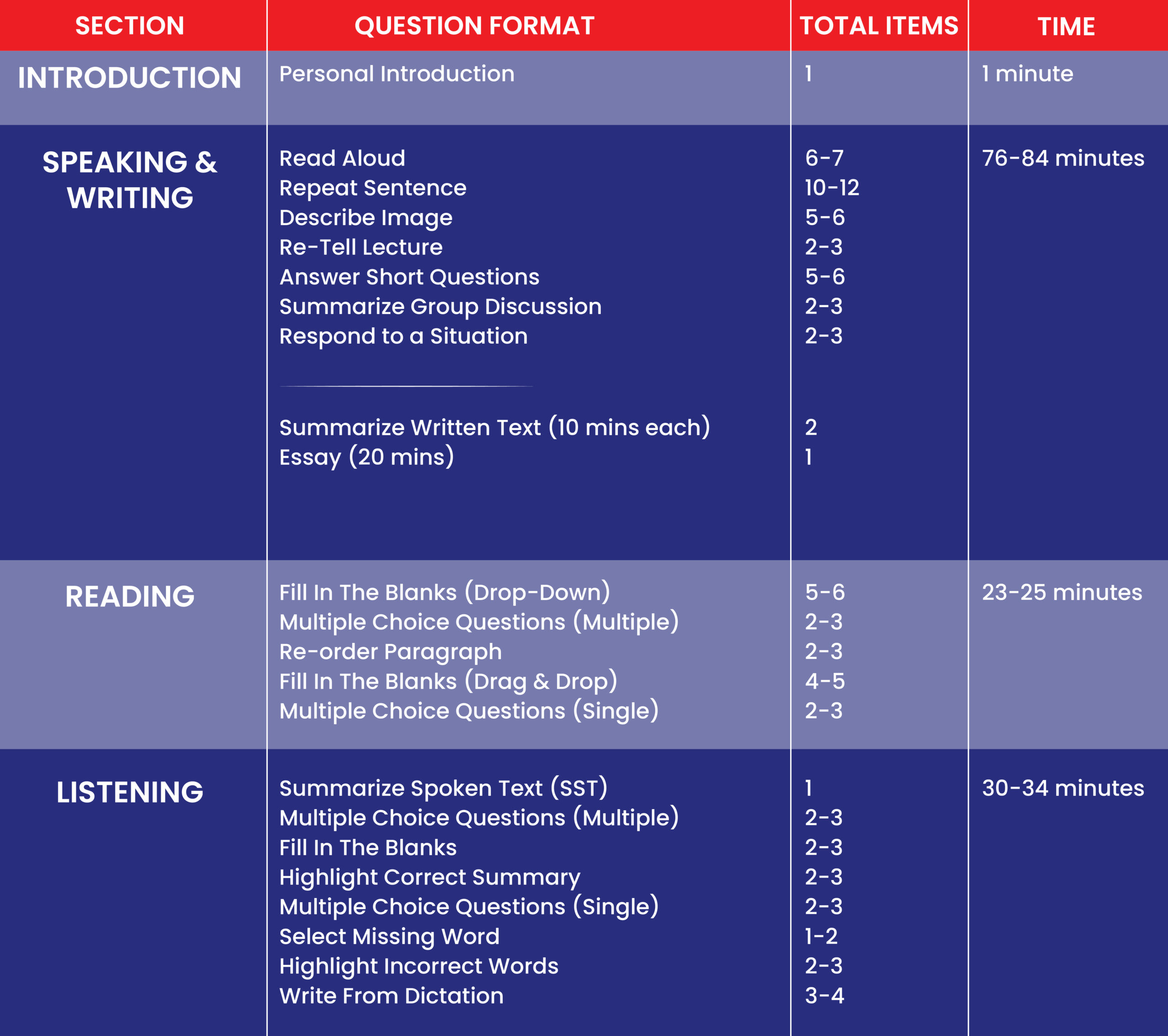
Proven Results: Our Students’ Success


Elevate Your English Proficiency with Our Premier Online PTE Preparation
Experience Top-Quality Training
Why Enroll in Learn With Hafiz for PTE Preparation?
Beyond Ordinary Coaching—Experience the Best Online PTE Preparation to Improve Your English Skills
Understanding PTE Academic
The Pearson Test of English Academic (PTE Academic) is a computer-based test designed for students and professionals aiming to study or work in English-speaking countries. It is trusted by universities, governments, and employers worldwide for its accuracy in assessing English language proficiency.
Test Format
The PTE Academic test evaluates your listening, reading, speaking, and writing skills. The listening section involves responding to spoken passages, while the reading section tests comprehension through a variety of texts. In the speaking and writing sections, you will provide responses to visual prompts and essay tasks, all completed in front of a computer with AI-based evaluation.
Why Choose PTE Academic?
PTE Academic is renowned for its fast results, typically delivered within 48 hours, and is widely accepted by thousands of institutions and organizations globally. Its AI-powered technology ensures an accurate and unbiased assessment, making it a trusted choice for English proficiency testing.
Free Scorecard Analysis
Already sat an exam? Send your scorecard to Master Trainer Hafiz and get a personalised breakdown of exactly where you lost marks and what to fix before your next attempt.